
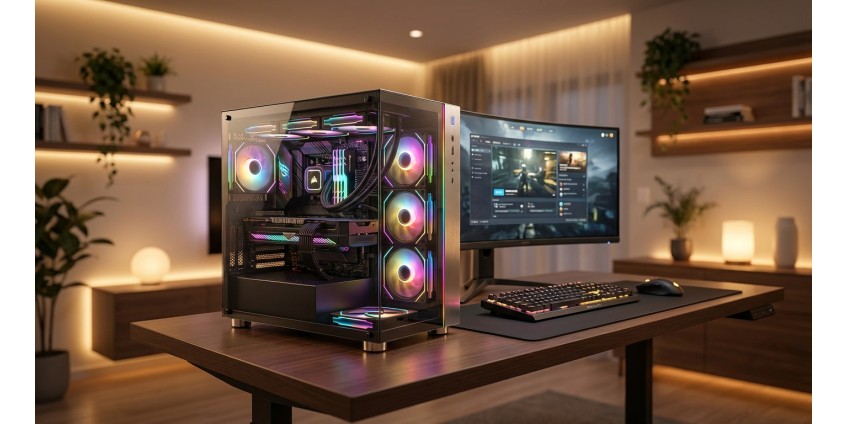
How to Build a Gaming PC Setup in 2026: Choosing the Case, Components, and Peripherals for the Perfect Build
Building the perfect gaming setup in 2026 isn't just about buying powerful hardware. It's about choosing every component, from the chassis to the peripherals, to ensure maximum comfort during long gaming sessions. In this article, we'll explain what to look for when building a gaming PC to get the optimal balance between performance, price, and functionality.
Choosing a Gaming PC Case: The Foundation of Your Build
A case is more than just a box for components. It is the foundation that determines the system's expandability, cooling, and overall ergonomics of the workstation. When choosing a case for a gaming setup in 2026, there are several key factors to consider.
First, the form factor. It should match the size of your motherboard. The most popular ones are ATX, Micro-ATX, and Mini-ITX. If you're planning a compact build for a small space, look for Micro-Tower cases that support micro ATX and Mini-ITX motherboards.
For those looking for a compact solution, you should consider the Chieftec UNI BS-10B-300 mATX case . This is a Micro-Tower case with a built-in 300W power supply, which makes it a good option for budget or office builds. It is equipped with modern ports, including USB Type-C and a card reader, which adds convenience. However, for a full-fledged gaming setup with a powerful graphics card, this case may be limited due to the maximum graphics card length of 240 mm and the height of the cooler of 120 mm.

When choosing a case for serious gaming, pay attention to the following parameters:
- Space for a graphics card – modern top-end graphics cards can reach 320-350 mm in length
- CPU cooler height – for powerful cooling systems, at least 160-170 mm is required
- Cooling options – availability of places to install additional fans or liquid cooling
- Cable management – special slots and fasteners for neat wiring
- Front ports – USB 3.0, USB Type-C, audio jacks for convenient peripheral connection
Gaming PC Components: The Heart of Your System
Motherboard
The motherboard is the central element that connects all the components. In 2026, when choosing a motherboard for gaming, you should focus on chipsets that support the latest processors and memory standards. For Intel, this is the Z790 series or higher, for AMD - X670E or B650.
Be sure to check for:
- Enough M.2 slots for fast SSDs
- Supports DDR5 memory for maximum performance
- High-quality processor power management system (VRM) for stable overclocking
- Modern interfaces – USB 3.2 Gen 2, Thunderbolt 4
- Built-in Wi-Fi 6E or 7 for wireless connectivity
If you are looking for quality motherboards for your build, pay attention to models from trusted manufacturers with good BIOS and driver support.
Processor and graphics card
The processor and graphics card are a duo that directly determines gaming performance. In 2026, the optimal choice for gaming is processors with 6-8 cores for Full HD and 1440p, or 8-12 cores for 4K and streaming.
As for graphics cards, it all depends on your budget and target resolution. For comfortable gaming in Full HD with high settings, mid-range cards are suitable, for 1440p - upper-mid-range, and for 4K you need top-end solutions.
Important: Always check that your case and power supply support the size and power consumption of your chosen graphics card. Check out the range of graphics cards in our catalog to choose the best option.
RAM
In 2026, the minimum standard for gaming is 16GB of RAM, but 32GB is recommended for modern AAA games and multitasking. If your motherboard supports DDR5, go for it - it provides higher bandwidth and lower latency.
The optimal frequency for DDR5 in 2026 is from 6000 MHz, for DDR4 - from 3600 MHz. Choose kits of two modules for dual-channel operation, which significantly increases performance.
Storage devices
SSDs have become the standard for gaming systems. For the operating system and the most intensive games, choose an NVMe SSD with a PCIe 4.0 or 5.0 interface with a capacity of 1 TB or more. With read speeds of over 5000 MB/s, games and levels load instantly.
You can add a second, more affordable 2-4TB SSD or a traditional HDD to store your game library. Check out our SSD section to find the drive that fits your needs.
Power supply
The power supply is a component that you shouldn't skimp on. For an average gaming PC, a 650-750W PSU with an 80 Plus Bronze certificate or higher is sufficient. For top-end configurations with powerful graphics cards, you need 850-1000W models.
Be sure to choose modular or semi-modular PSUs - this will simplify cable management and improve air circulation in the case. Check that all the necessary connectors for your graphics card are available (8-pin, 12VHPWR for new cards).
Cooling system: maintaining optimal temperature
Effective cooling is the key to stable operation and durability of components. In 2026, there are two main types of processor cooling: air and liquid.
Air coolers are reliable, quiet, and maintenance-free. For most gaming builds, a high-quality tower cooler with a height of 150-160 mm is sufficient. Check compatibility with the case and RAM.
Liquid cooling systems (LCS) provide better performance, especially for overclocked processors. All-in-One (AIO) systems with 240-360 mm radiators are the optimal choice for gaming. They are efficient, relatively easy to install, and look aesthetically pleasing.
Don't forget about case fans. The optimal configuration is 2-3 fans for intake at the front and 1-2 for exhaust at the back and top. This will ensure positive pressure and effective air circulation.
Gaming peripherals: comfort and precision
Monitor
Your monitor is your window into the virtual world. In 2026, the best choice for competitive shooters is a Full HD monitor with a refresh rate of 240-360 Hz and a response time of 1 ms. For single-player games and immersive experiences, it is better to choose a 1440p or 4K monitor with a frequency of 144-165 Hz.
Be sure to pay attention to the type of matrix (IPS for better viewing angles and colors, TN for the fastest response, VA for deep black) and support for adaptive synchronization (G-Sync or FreeSync).
Keyboard and mouse
A mechanical keyboard is a must-have for any serious gamer. Choose the switches based on your preferences: linear for fast actuation, tactile for a tactile response, clicky for maximum feedback. RGB lighting not only looks great, but can also be useful for quickly finding the right keys.
A gaming mouse should be comfortable, precise, and fast. Optical sensors with DPI starting at 16,000 will provide the necessary accuracy. Weight, shape, and number of additional buttons are a matter of personal preference. Try several models before buying, if possible.
You will find a wide selection of gaming peripherals in the Gaming section of our store.
Headphone
High-quality audio in games is not only fun, but also a competitive advantage. Gaming headphones with 7.1 virtual surround sound will help you accurately determine the location of enemies by the sound of footsteps.
Choose between wired and wireless models depending on your needs. Wired provides zero latency, wireless provides freedom of movement. The microphone should be clear and noise-canceling for comfortable communication with the team.
Additional accessories for the perfect setup
A large mousepad will provide plenty of room for wide mouse movements and create a unified workspace. Choose models with stitched edges for durability.
A headphone stand will help organize your workspace and keep your peripherals tidy. Models with a USB hub will add functionality.
Cable management is not just about aesthetics, it's also about practicality. Use cable ties, clips, and organizers to neatly route your cables. This will improve air circulation and make future upgrades easier.
RGB lighting is the final touch to create an atmosphere. LED strips, synchronized with other components via software, will create a unique visual image of your setup.
Conclusions: assembling the perfect gaming setup
Building a gaming setup in 2026 is a balance between performance, budget, and personal preference. Start by determining your target resolution and the types of games you plan to play. This will help you allocate your budget appropriately between components.
Don't try to build the most powerful system if it doesn't meet your needs. A balanced mid-range configuration often provides a better experience for your money than a top-of-the-line system that's biased toward one component.
Keep future upgrades in mind. Choose a motherboard with plenty of slots, a power supply with power reserve, and a case with enough space for expansion. This will allow you to gradually improve your system without completely replacing all components.
Invest in quality peripherals – they directly affect your comfort and gaming performance. A good keyboard, mouse, and headphones will last for years and work with a variety of PC configurations.
And most importantly, take your time. Study the market, read reviews, compare prices. A properly assembled gaming setup will bring you gaming pleasure for years to come and will become a reliable tool not only for entertainment, but also for work or study.