
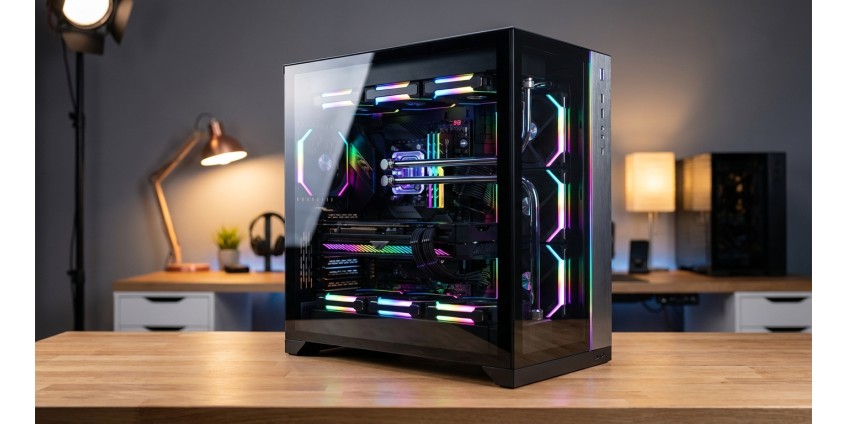
How to Choose a PC Case in 2026: Form Factors, Cooling, Component Support, and Design for the Perfect Build
Choosing a case for your personal computer is one of the most important stages of building a system unit that many users underestimate. A properly selected case provides not only an aesthetic appearance for your build but also effective cooling, ease of maintenance, and the possibility of future upgrades. In 2026, the market offers a wide selection of solutions for any needs — from compact office systems to powerful gaming stations. Let's take a detailed look at what you should pay attention to when choosing a case for your PC.
Case Form Factors: Finding the Optimal Size
The first thing you need to determine when choosing a case is its form factor. This parameter determines what motherboard you can install, how many components you can fit inside, and where you can place the finished system.
Full Tower — Maximum Space
The largest cases that support E-ATX, XL-ATX, ATX, Micro-ATX, and Mini-ITX motherboard formats. An ideal choice for enthusiasts who plan to install multiple graphics cards, liquid cooling systems, or need plenty of space for storage drives. Such cases typically weigh over 10 kg and take up considerable space.
Mid Tower — The Golden Mean
The most popular form factor among gamers and regular users. Supports ATX, Micro-ATX, and Mini-ITX motherboards. Offers enough space for a powerful graphics card, several storage drives, and an effective cooling system while remaining relatively compact.
Micro Tower — Compactness Without Compromise
Cases for Micro-ATX and Mini-ITX motherboards. An excellent choice for home or office systems where space saving is important. Despite smaller dimensions, modern Micro Tower cases can accommodate high-performance components and provide acceptable cooling.
An example of a compact yet functional solution is the Chieftec UNI BS-10B-300 mATX Case, 300W PSU, SLIM FF, USB Type C, CardReader. This case supports micro ATX and Mini-ITX motherboards, has a built-in 300W power supply, and is equipped with modern ports including USB Type-C and a card reader. The maximum graphics card length is 240 mm, and CPU cooler height is up to 120 mm, making it ideal for office systems or compact multimedia PCs.

Mini-ITX — Minimalism for Enthusiasts
The most compact cases designed exclusively for Mini-ITX motherboards. Ideal for creating HTPCs (Home Theater PCs), compact gaming systems, or multimedia centers. They require careful build planning due to limited internal space.
Cooling System: The Key to Stable Operation
Effective cooling is a critically important aspect of any case. Even the most powerful components won't be able to reach their potential if they overheat.
Fan Support
Modern cases offer mounting locations for 2 to 10+ fans of various sizes: 80mm, 120mm, 140mm, and 200mm. The larger the fan diameter, the quieter it operates at the same performance level. The optimal configuration includes 2-3 intake fans at the front or bottom and 1-2 exhaust fans at the rear and top.
Liquid Cooling Support
If you plan to use a liquid cooling system (AIO), make sure the case supports installation of radiators of the required size: 120mm, 240mm, 280mm, 360mm, or even 420mm. Pay attention to mounting locations — front, top, rear, or bottom of the case.
Dust Filters
Removable and washable dust filters significantly simplify system maintenance and extend component lifespan. Ideally, filters should be installed at all air intake points and easily removed without disassembling the case.
Component Support: Planning for the Future
When choosing a case, it's important to consider not only the current configuration but also possible future upgrades.
Graphics Card Length
Modern top-tier graphics cards can reach 350-400mm in length. Make sure the chosen case supports installation of a card of the required size with room to spare for normal air circulation. Note that some cases require removing hard drive mounts to install long graphics cards.
CPU Cooler Height
If you plan to use a powerful air cooling system for the processor, check the maximum allowable cooler height. For compact cases, this may be 120-160mm, for Mid Tower — 160-180mm, and for Full Tower — over 180mm.
Storage Drive Bays
Modern cases offer a combination of bays for 2.5" SSDs and 3.5" HDDs. If you work with large amounts of data, choose a case with a sufficient number of storage locations. Tool-free drive mounting systems are also useful.
Power Supply Placement
Most modern cases place the power supply at the bottom, which improves overall system balance and cooling. Top PSU placement is found in older or budget models. Pay attention to the presence of a separate chamber for the PSU with its own dust filter.
Materials and Build Quality
Cases are made from various materials, which affects their weight, durability, and price.
Steel
The most common material for cases. Metal thickness varies from 0.5 to 1.2mm. Thicker steel provides better structural rigidity and reduces vibrations but increases weight. Quality cases have a thickness of 0.7mm or more.
Aluminum
Lighter than steel, has an attractive appearance and good heat dissipation properties. Used in premium segment cases. Disadvantages — higher price and less durability compared to steel.
Tempered Glass and Acrylic
Side panels made of glass or acrylic allow you to showcase internal components and RGB lighting. Tempered glass looks more premium and is more scratch-resistant but is heavier and more expensive. Acrylic is lighter and cheaper but scratches easily.
Cable Management System
A quality cable routing system not only improves build aesthetics but also positively affects cooling.
Look for cases with sufficient space behind the motherboard (minimum 15-20mm), numerous cable routing holes with rubber grommets, tie-down points, and the ability to hide excess cable length.
Front Panel and Ports
Daily use convenience largely depends on the location and set of front panel ports.
Essential Ports in 2026
- USB 3.0/3.1 Type-A — minimum 2 ports
- USB Type-C — preferably at least one port
- Audio outputs for headphones and microphone
- Power and reset buttons
- Activity and storage drive indicators
Some cases also offer additional features such as card readers, fan speed controllers, or RGB lighting controllers.
Design and Aesthetics
The external appearance of a case is a matter of personal taste, but there are several 2026 trends worth noting.
Minimalism
Clean lines, absence of unnecessary details, monochrome colors. Such cases easily fit into any interior and don't go out of style.
RGB Lighting
Built-in lighting with the ability to synchronize with other system components through technologies like ASUS Aura Sync, MSI Mystic Light, or Gigabyte RGB Fusion.
Retro Design
Cases styled after classic computers from the 80s-90s are gaining popularity among enthusiasts.
Additional Features and Characteristics
Modern cases can offer various additional capabilities that increase ease of use.
Modularity
The ability to reconfigure internal space depending on needs — move storage drive mounts, change fan positions, install vertical mounting for graphics cards.
Noise Insulation
Special panels made of sound-absorbing material on the internal surfaces of the case significantly reduce noise levels from fans and drives.
Quick Access
Tool-free side panel opening systems, removable mounts for storage drives and graphics cards simplify system maintenance and upgrades.
Budget and Price Range
Cases are available in a wide price range — from 1500 to 30000+ hryvnias.
Budget Segment (1500-3000 UAH): Basic steel cases, minimal feature set, limited cable management capabilities. Suitable for office systems or budget builds.
Mid-Range Segment (3000-7000 UAH): Optimal price-to-quality ratio. Good cooling system, convenient cable management, quality materials, modern design.
Premium Segment (7000+ UAH): Use of quality materials, innovative design, maximum functionality, best cooling and customization capabilities.
What to Pay Attention to When Buying
Before making a final case choice, we recommend:
- Check compatibility with your motherboard and other components
- Ensure that graphics card and CPU cooler dimensions meet case limitations
- Evaluate cooling system capabilities and availability of locations for additional fans
- Check for necessary front panel ports
- Read reviews from real users about build quality and ease of use
- Consider case dimensions and weight relative to its placement location
If you're building a complete system and looking for quality PC components, it's worth paying attention not only to the case but also to other important components. Also don't forget about workspace organization — check out our range of laptop stands and desks, which can be useful for convenient peripheral placement.
Conclusion
Choosing a PC case in 2026 is a balance between functionality, aesthetics, and budget. A properly selected case will serve you for years, providing reliable component protection, effective cooling, and ease of maintenance. Determine the form factor according to your needs, ensure sufficient cooling capabilities, verify compatibility with current and future components, evaluate material quality and cable management convenience. Don't skimp on the case — it's an investment that will pay off with a long service life and comfort in using your personal computer. Whether you're building a compact office system or a powerful gaming station, the market will definitely have a case that perfectly meets your requirements.
Products related to this post
₴89 грн. ₴184 грн.
Add to Cart
₴549 грн. ₴699 грн.
Add to Cart

₴5,335 грн. ₴7,049 грн.
Add to Cart