
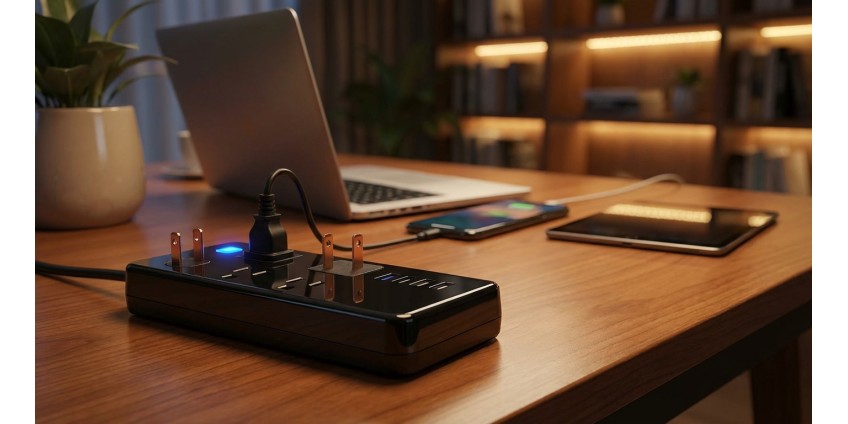
How to Choose a Surge Protector for Electronics Protection: Types of Protection, Number of Outlets, and the Importance of Joules
The modern home is filled with electronics: computers, televisions, routers, projectors, and other expensive devices. All of them require reliable protection from voltage surges, power spikes, and other electrical anomalies. A regular power strip cannot provide such protection—you need a quality surge protector for that. In this article, we'll explain how to properly choose a surge protector in 2026, what to look for when buying, and why the joule rating is a critically important parameter.
What is a Surge Protector and How Does it Differ from a Power Strip
Many people confuse surge protectors with regular power strips. They may look similar on the outside, but their functionality is fundamentally different. A power strip is simply a cable with multiple outlets that allows you to connect more devices at a distance from the main outlet. It provides no protection from electrical problems.
A surge protector, on the other hand, is equipped with special components that protect connected equipment from:
- Power surges
- Voltage fluctuations
- Electromagnetic interference
- Radio frequency interference
- Short circuits
Quality surge protectors contain varistors (MOV — Metal Oxide Varistor), which absorb excess energy during voltage spikes, preventing it from reaching your devices. This is especially important for expensive electronics, as one powerful surge can permanently damage a television, computer, or other equipment.
Types of Protection in Surge Protectors
Basic Surge Protection
The simplest surge protectors offer basic protection from power surges. They use varistors to divert excess energy to ground. Such models are suitable for protecting less critical equipment: desk lamps, charging devices, small household appliances.
Protection from Electromagnetic and Radio Frequency Interference (EMI/RFI)
More advanced filters include components for filtering electromagnetic (EMI) and radio frequency (RFI) interference. These disturbances can create "noise" in the power grid, which negatively affects the operation of sensitive electronics—audio equipment, video equipment, computers. If you've noticed sudden artifacts on your monitor screen or hissing in speakers, it's likely the result of electromagnetic interference.
Phone and Coaxial Line Protection
Some surge protectors have additional inputs for protecting phone lines and coaxial cables. This is important if your router is connected through a phone line, or if you use cable internet or television. A surge can enter a device not only through an electrical outlet, but also through other cables.
Automatic Shutdown in Critical Situations
The best models are equipped with an automatic shutdown system that activates during critical overloads or when protective components have exhausted their capacity. This prevents situations where the filter is no longer able to protect but continues to supply power to connected devices.
Joule Rating: Why This is the Most Important Parameter
The Joule Rating is an indicator of how much energy a surge protector can absorb before its protective components are exhausted. The higher the joule value, the longer the filter will be able to protect your equipment and the more powerful voltage spikes it can withstand.
Here are approximate recommendations for joule ratings:
- 200-400 joules: Suitable for basic protection of small devices—charging stations, desk lamps, simple gadgets
- 600-1000 joules: Optimal choice for a home office—computer, monitor, printer
- 1500-2000 joules: Recommended for expensive electronics—home theaters, gaming consoles, professional equipment
- 2500+ joules: Maximum protection for the most expensive equipment—servers, studio equipment, expensive projectors
It's important to understand that the joule rating is not an indicator of the power of a single hit, but the total energy that the filter can absorb over its entire service life. Each voltage spike "eats up" part of this resource. After the rating is exhausted, the filter turns into a regular power strip without protection.
Number of Outlets: How Many Do You Need
When choosing a surge protector, consider not only the number of outlets, but also their placement. Here are some practical tips:
Optimal Number
For a home office, 4-6 outlets are usually sufficient. This will allow you to connect a computer, monitor, printer, smartphone charger, and other peripheral devices. For an entertainment center (TV, media player, gaming console, audio system), it's better to choose models with 8-10 outlets.
Outlet Placement
Pay attention to the distance between outlets. Large power adapters can block adjacent sockets. Some manufacturers position outlets at an angle or with larger gaps to avoid this problem. Models with rotating outlets or those that have several outlets located on different sides of the housing are also useful.
USB Ports
Modern surge protectors are often equipped with USB ports for charging smartphones, tablets, and other gadgets. This is convenient as it frees up regular outlets. When choosing, pay attention to the current strength of USB ports—for fast charging, you need at least 2.4A per port.
Additional Features and Characteristics
Cable Length
The cable length should match your needs. For use near a desk, 1-2 meters is sufficient. If the filter will be far from the outlet, choose models with a 3-5 meter cable. You shouldn't use unnecessarily long cables—this can increase voltage losses.
Status Indicators
A useful feature is status indicator lights that show the state of protection. Usually these are two LEDs: one shows the presence of power, the other—the functionality of surge protection. If the protection indicator goes out, the filter needs to be replaced.
Power Switch
Having a master switch allows you to quickly de-energize all connected devices without unplugging from the outlet. This is convenient and saves electricity, as many devices consume energy even in standby mode.
Mounting
Some surge protectors have holes for wall mounting or the ability to mount under a desk. This helps organize workspace and avoid cable clutter.
Response Time and Clamping Voltage
Response time is the speed at which the filter reacts to a voltage spike. The lower the value, the better. Good filters have a response time of less than 1 nanosecond. This is critically important for sensitive electronics.
Clamping voltage shows at what voltage level the protection activates. Standard values: 330V, 400V, 500V. A lower value means better protection. For expensive electronics, choose filters with a clamping voltage no higher than 400V.
Common Mistakes When Choosing a Surge Protector
Many users make typical mistakes that can be costly:
- Saving on quality: A cheap filter may not have real protection, being essentially a regular power strip with a button
- Ignoring joule rating: A filter with a low rating will quickly exhaust its capacity and stop protecting
- Connecting high-power appliances: Heaters, kettles, irons should not be connected to surge protectors—they consume too much energy
- Daisy-chaining filters: Connecting one filter to another can create a dangerous situation and reduce protection effectiveness
- Lack of grounding: Without proper grounding, the filter's effectiveness is significantly reduced
When to Replace a Surge Protector
Surge protectors are not eternal. They need to be replaced in the following cases:
- The surge protection indicator has gone out
- After a powerful lightning strike near your home
- After 3-5 years of active use (even if the indicator is lit)
- When a burnt plastic smell appears or visible damage to the housing
- If outlets start sparking or hold plugs poorly
Practical Usage Tips
To use a surge protector most effectively:
- Connect only electronics to it, not household appliances with heating elements
- Place the filter in an accessible location for easy shutdown if needed
- Don't overload the filter—consider the maximum power (usually 2500-3000 W)
- During thunderstorms, unplug the filter from the outlet if you're not using equipment
- Periodically check the status of indicators and the device itself
- Keep the filter away from sources of moisture and dust
Conclusion
Choosing a quality surge protector is an investment in the safety of your expensive electronics. When choosing in 2026, pay attention to the joule rating (at least 1000 for home use), the number and placement of outlets, the presence of status indicators, and additional protection features. Don't confuse surge protectors with regular power strips—the former provide real protection from voltage fluctuations, power surges, and electromagnetic interference.
Remember that the cost of even the most expensive surge protector is only a fraction of the cost of the equipment it protects. Saving on protection can lead to much greater expenses for repairing or replacing damaged equipment. Choose filters from trusted manufacturers, pay attention to technical specifications, not just appearance and number of outlets. A properly selected surge protector will provide reliable protection for your electronics for years to come.
In our GadgetGuys store, you'll find a wide range of surge protectors, adapters, and power strips for any needs—from basic models for home use to professional solutions for offices and studios.
Products related to this post

₴79 грн.
Add to Cart
₴5,999 грн. ₴9,499 грн.
Add to Cart
₴75,460 грн. ₴86,100 грн.
Add to Cart