
Portable SSD vs HDD vs Flash Drives 2026: Backup Comparison
Introduction: Why Storage Choice Matters in 2026
In today’s digital world, the amount of data we create every day is growing exponentially. Photos, 4K and 8K videos, work documents, projects, music—all require reliable storage and quick access. Choosing the right type of portable storage can make a big difference in your productivity, data security, and ease of use.
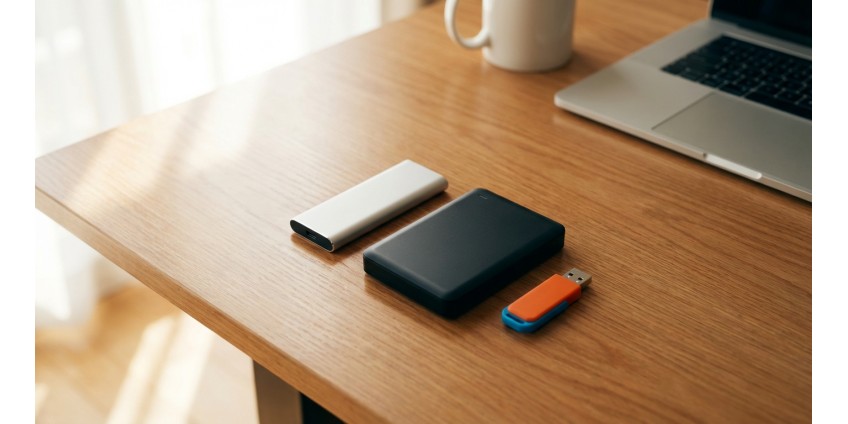
There are three main types of portable storage devices on the market in 2026: SSDs (solid-state drives), HDDs (hard drives), and USB flash drives. Each has its own advantages, disadvantages, and optimal usage scenarios. Let's take a closer look at which option is right for you.
Portable SSDs: the speed and reliability of the future
Solid-state drives have revolutionized the storage industry due to their lack of moving parts, making them extremely fast and resistant to mechanical damage.
Advantages of portable SSDs
- Data transfer speed: Modern SSDs provide read and write speeds of up to 2000-3500 MB/s, which is dozens of times faster than HDDs and flash drives
- Compactness: Portable SSDs are usually credit card sized or smaller
- Shock resistance: The lack of mechanical parts makes them virtually invulnerable to drops
- Silent operation: They operate completely silently
- Energy efficient: Consume less power compared to HDD
Disadvantages of SSDs
- Higher price: The cost per gigabyte is still higher than HDD
- Limited rewrite life: Although modern SSDs can withstand millions of cycles, they theoretically have a limited lifespan
Portable SSDs are ideal for professionals who work with large files - video editors, photographers, designers. If you need to quickly transfer a project of 50-100 GB or work with files directly from an external drive, an SSD will become an indispensable assistant. In our store you can find a wide selection of portable SSDs for different needs.
Portable HDDs: maximum capacity at an affordable price
Hard drives remain popular due to their excellent price-to-capacity ratio. They use magnetic platters to store data, making them cheaper to manufacture.
Advantages of portable HDDs
- High capacity: It's easy to find 2-5TB models at a reasonable price
- Affordability: Lowest cost per gigabyte of any storage type
- Data Durability: When stored properly, data can last for decades
- No overwrite restrictions: You can overwrite data an unlimited number of times
Disadvantages of HDDs
- Slow speed: Typically 80-120 MB/s, which is 10-30 times slower than SSD
- Sensitivity to shock: Moving parts make them vulnerable to mechanical damage
- Noise: A characteristic hum can be heard during operation
- Larger sizes: Typically thicker and heavier than SSDs
- Higher power consumption: Requires more energy to operate
Portable HDDs are the perfect choice for backing up large amounts of data, archiving photos and videos, and storing your media library. If you need to store 2-4 TB of data and speed is not critical, an HDD will be the most economical solution. Check out our range of portable HDDs for backup.
USB flash drives: compactness and versatility
Flash drives remain the most popular option for quickly transferring small amounts of data due to their compactness and versatility.
Advantages of flash drives
- Maximum compactness: Keychain size, easy to carry in your pocket
- Versatility: Works with any device with a USB port
- Affordable: 32-128 GB models are inexpensive
- No additional power required: Powered by USB port
- Durability: Withstands shock and moisture better than HDDs
Disadvantages of flash drives
- Limited capacity: Usually up to 256-512 GB, rarely more
- Average speed: 50-150 MB/s for budget models, up to 500 MB/s for premium ones
- Easy to lose: Due to small size
- Limited life: Cheap models can quickly fail with heavy use
Flash drives are ideal for everyday carrying of documents, presentations, small projects. They are indispensable for students, office workers and anyone who needs to quickly transfer files between different computers. Check out our catalog of flash drives of various capacities.
Comparison table: SSD vs HDD vs flash drives
To make your choice easier, here is a quick comparative overview of the key parameters:
- Speed: SSD (up to 3500 MB/s) > Premium flash drives (up to 500 MB/s) > HDD (80-120 MB/s) > Budget flash drives (50-100 MB/s)
- Price per GB: HDD (lowest) > Flash drives > SSD (highest)
- Capacity: HDD (up to 5 TB+) > SSD (up to 4 TB) > Flash drives (up to 512 GB)
- Reliability: SSD > Flash drives > HDD
- Compactness: Flash drives > SSD > HDD
- Power consumption: Flash drives < SSD < HDD
How to choose a storage device for your needs
Choose SSD if:
- You work with large files (4K/8K video, RAW photos, 3D models)
- You need maximum data transfer speed
- You often work with files directly from an external drive
- The drive will be moved and at risk of falling
- Budget allows you to invest in speed and reliability
Choose HDD if:
- You need to store large amounts of data (more than 1 TB)
- Main purpose — backup and archiving
- Speed is not a critical factor
- You want to save as much as possible on storage costs
- The drive will be used mainly stationary
Choose a flash drive if:
- You need to transfer documents and small files
- Maximum compactness is important
- You often work with different computers.
- Need quick access to files without additional cables?
- The data volume does not exceed 128-256 GB
Additional recommendations for data security
Regardless of the type of storage device you choose, remember the basic rules of data security:
- Rule 3-2-1: Three copies of data on two different types of media, one of which is stored separately
- Regularity: Create backups regularly, ideally automatically
- Verification: Periodically verify the integrity of stored data
- Physical security: Store drives in a dry place, protected from extreme temperatures
- Encryption: Use hardware or software encryption for sensitive data
If you are looking for a comprehensive solution for organizing your workspace, pay attention to USB hubs , which allow you to simultaneously connect multiple drives and other devices to your computer or laptop.
Conclusion: optimal data storage strategy
There is no one-size-fits-all solution in 2026. The best strategy is a combined approach that leverages the benefits of each storage type.
The ideal combination for most users looks like this: a portable 500 GB - 1 TB SSD for active projects and quick access to work files, a portable 2-4 TB HDD for backup and archiving, and a 64-128 GB flash drive for daily document transfer between devices.
For professionals who work with large amounts of data, it is worth considering two SSDs of different capacities - one for active work, the second for backup. For home users who mainly store photos and videos, a large HDD for archiving and a flash drive for current needs will be optimal.
Remember, the best storage is the one that meets your needs in terms of speed, capacity, reliability, and price. Invest in quality solutions from trusted manufacturers, and your data will always be safe and at hand when you need it.
", "short_description": "Choosing a portable drive for backup and data transfer? We analyze the advantages and disadvantages of SSDs, HDDs, and flash drives in 2026 to help you make the right choice according to your needs and budget." } ```