
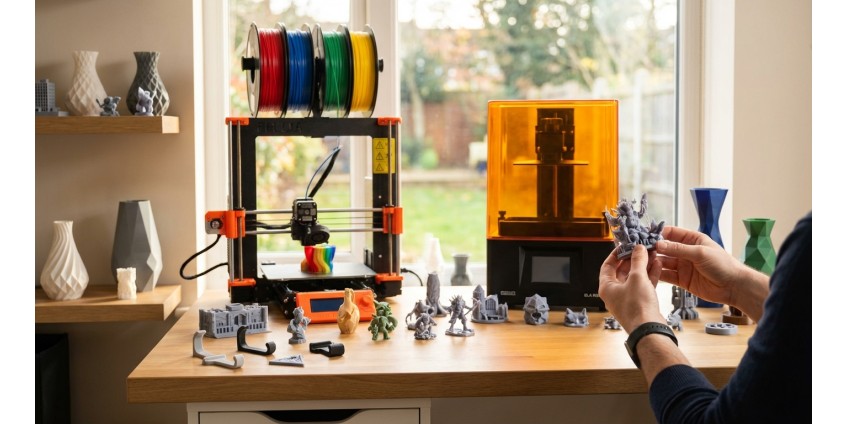
How to Choose a 3D Printer for Home in 2026: FDM vs SLA Technologies, Materials, Calibration, and First Projects for Beginners
3D printing is no longer something out of science fiction—today it's an accessible technology for home use. If you've been thinking about buying a 3D printer but don't know where to start, this article will help you understand the key aspects of choosing, setting up, and taking your first steps in the exciting world of three-dimensional printing.
Main 3D Printing Technologies: FDM vs SLA
The first thing to decide when choosing a printer is the printing technology. For home use, the two most popular are: FDM (Fused Deposition Modeling) and SLA (Stereolithography).
FDM — The Most Popular Choice for Beginners
FDM printers work by layering melted plastic. The extruder heats filament (plastic thread) and extrudes it through a nozzle, forming an object layer by layer. This technology has several important advantages:
- Affordable price — basic models can be found starting from a few thousand hryvnias
- Wide selection of materials — PLA, ABS, PETG, TPU, and others
- Easy maintenance and operation
- Safe for home use
- Ability to print large objects
FDM technology is ideal for creating functional items, prototypes, toys, and decorative elements. For example, you can print a collectible Labubu figure, which will be an excellent example of FDM printing capabilities.
![Колекційна фігурка Іграшка Лабубу Labubu [FDM-друк]](/image/catalog/easyphoto/5906/grashka-ruhliva-red-panda-chervona-panda-fdm-druk-1.png)
SLA — For Detailed Models
SLA printers use liquid photopolymer resin that hardens under ultraviolet light. This technology provides exceptionally high detail and smooth surface finish on completed products. SLA advantages:
- High precision and detail (up to 25 microns)
- Perfectly smooth surface without visible layers
- Excellent for jewelry, dental models, miniatures
However, SLA also has disadvantages: higher price, need for post-processing (washing in isopropyl alcohol, additional curing), limited material selection, and the need to work in a well-ventilated area.
Choosing Materials for 3D Printing
For FDM printers, several types of filament are most popular, each with its own characteristics.
PLA — The Perfect Start
PLA (polylactic acid) is a biodegradable plastic based on corn starch or sugarcane. It's the best choice for beginners:
- Low printing temperature (190-220°C)
- Minimal warping when cooling
- Doesn't require heated bed (though it's better to have one)
- Pleasant smell when printing
- Variety of colors and effects
On our website, you can find a wide range of PLA plastic in various colors and brands. It's important to store filament in a dry place, as it's hygroscopic and absorbs moisture from the air, which can deteriorate print quality.
ABS — For Durable Products
ABS (acrylonitrile butadiene styrene) is a stronger and more heat-resistant material, but more difficult to print. Requires heated bed at 80-110°C and enclosed print chamber to prevent warping.
PETG — The Golden Middle
PETG combines the ease of printing PLA with the strength of ABS. It's resistant to moisture, impacts, and has good layer adhesion. An excellent choice for functional parts.
3D Printer Calibration: First Steps
Quality printing is impossible without proper printer calibration. Here are the main setup stages:
Bed Leveling
This is the most important step. The bed must be perfectly parallel to the nozzle across the entire surface. Most printers have mechanical leveling using screws under the bed. Some models are equipped with Auto Bed Leveling, which greatly simplifies the process.
Classic method: Place a sheet of paper between the nozzle and bed, lower the nozzle so the paper moves with slight resistance. Repeat at several points on the bed.
Extruder Calibration
Make sure the printer extrudes exactly as much plastic as needed. Measure 100 mm of filament, command the extruder to extrude 100 mm, and check if the values match. If not—adjust the E-steps parameter in the firmware.
Temperature Settings
Each type of filament has its own temperature range. Print a temperature tower to determine the optimal temperature for your specific plastic and printer.
Retraction Calibration
Retraction is the reverse movement of filament to prevent plastic oozing during non-printing movements. Adjust retraction distance and speed to avoid "stringing" between model elements.
First Projects for Beginners
Start with simple models to master the technology and printer settings.
Calibration Models
A 20x20x20 mm calibration cube will help verify dimensional accuracy. Benchy (a small boat) is a standard test for assessing print quality, including various complex elements.
Practical Home Items
Desk organizers, phone holders, clothing hooks, cable organizers—all useful items that are easy to print. Check out our 3D printing section, where you'll find ready-made models and project ideas.
Toys and Decor
Figures of favorite characters, board games, decorative elements—these are not only interesting to print but also great gifts. Browse the 3D printed models category for inspiration.
Spare Parts
One of the most useful capabilities of 3D printing is making spare parts for household appliances, toys, furniture. Broke a drawer handle? Print a new one!
Additional Equipment and Accessories
For comfortable work with a 3D printer, you'll need some additional tools:
- Scraper or spatula for removing models from the bed
- Side cutters for removing supports
- Files or sandpaper for post-processing
- Calipers for measuring wall thickness
- Containers for filament storage
It's important to store plastic properly. Moisture is the main enemy of filament. Use airtight containers with silica gel or special moisture absorbers to protect material from deterioration.
Software for 3D Printing
To prepare models for printing, you need a slicer—software that converts a 3D model into G-code (instructions for the printer).
Popular Slicers
Cura — free, user-friendly, supports most printers. Ideal for beginners.
PrusaSlicer — powerful tool with extensive customization options.
Simplify3D — paid but very functional slicer for experienced users.
Where to Find Models
Thingiverse, Printables, MyMiniFactory, Cults3D—free libraries with millions of ready-made models. You can also create your own models in programs like Tinkercad, Fusion 360, Blender.
Common Problems and Solutions
Model doesn't stick to bed — check leveling, increase bed temperature, use glue stick or special spray.
"Stringing" between model parts — adjust retraction, lower printing temperature.
Layers separating — increase printing temperature, reduce speed, check filament quality.
Corner warping — use heated bed, enclose print chamber, add brim in slicer.
Safety When Working with a 3D Printer
While 3D printing is relatively safe, several rules should be followed:
- Ensure room ventilation—some plastics emit volatile substances
- Don't leave the printer unattended for extended periods
- Be careful with hot parts—the nozzle heats up to 200-260°C
- Keep the printer away from children and pets
- Use quality power supply—you can use a quality power adapter for stable equipment operation
Conclusion
3D printing in 2026 is an accessible, exciting, and useful technology for home use. For beginners, the best choice will be an FDM printer with PLA plastic support. Start with simple projects, gradually master calibration and settings, experiment with different materials.
A properly configured printer will allow you to create quality functional items, decor, toys, spare parts, and bring your boldest ideas to life. The main things are patience, willingness to learn, and readiness to experiment. The world of 3D printing opens unlimited possibilities for creativity and practical application, and the initial investment will quickly pay off with useful and interesting products you can create yourself.
Products related to this post
₴79 грн.
Add to Cart
₴69 грн. ₴109 грн.
Add to Cart
![Collectible figure Labubu Toy [FDM printing]](https://gadgetguys.com.ua/image/cache/catalog/easyphoto/5906/grashka-ruhliva-red-panda-chervona-panda-fdm-druk-1-266x266.png "Collectible figure Labubu Toy [FDM printing]")

₴5,335 грн. ₴7,049 грн.
Add to Cart