How to Choose a Bluetooth Adapter for Your Car in 2026: Connecting an Old Radio to Your Smartphone
Why You Need a Bluetooth Adapter for Your Car
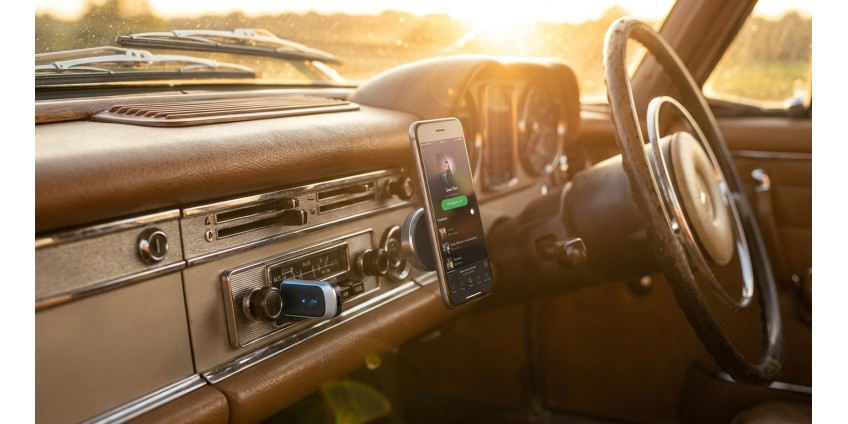
If your car was manufactured before 2015, the likelihood that its factory radio supports Bluetooth is quite low. But this doesn't mean you have to listen to the radio or buy a new audio system. A Bluetooth adapter is a simple and affordable way to upgrade old equipment and gain the ability to listen to music from your smartphone, take calls in hands-free mode, and use navigation prompts through your car speakers.
Modern adapters connect to standard AUX ports (3.5mm mini-jack) or USB, which are found in virtually every car radio from the last 15 years. They're compact, don't require complex installation, and are powered by the car's USB port or cigarette lighter. In 2026, the market offers countless options—from budget models at 200-300 hryvnias to premium solutions with aptX and AAC codec support.
Types of Bluetooth Adapters for Cars
Before purchasing, it's important to understand which type of adapter will work for your specific radio. There are several main categories of devices:
AUX Adapters
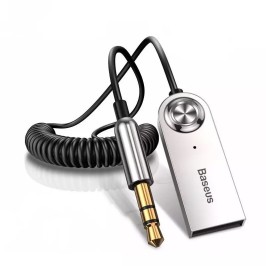
The most popular type is adapters with a 3.5mm (mini-jack) connector. They plug into the radio's AUX input and transmit audio signals via Bluetooth. These devices are typically powered by the car's USB port or a separate charger in the cigarette lighter. An example of a quality solution is the Baseus Wireless Adapter Cable USB-A + AUX to Bluetooth 5.0 Black (CABA01-01), which supports the modern Bluetooth 5.0 standard and provides a stable connection at distances up to 10 meters.

The Baseus model is particularly interesting because it combines USB power and AUX output in one compact cable. This means you don't need to look for separate charging—simply connect the USB to the radio's port or charger, and the mini-jack to the AUX input. The adapter automatically turns on when you start the engine and connects to the last used smartphone.
FM Transmitters with Bluetooth
If your radio doesn't have an AUX input but has a radio, you can use an FM transmitter. These devices transmit audio signals through an FM frequency that you tune on the radio. However, sound quality in this case will be lower due to the analog nature of FM transmission and possible radio interference.
USB Adapters
Some radios support music playback from USB drives. For such systems, there are special USB adapters that emulate a flash drive but actually receive audio via Bluetooth. This is a rare type of device, and you should check compatibility with your radio before purchasing.
Key Characteristics When Choosing an Adapter
Bluetooth Version
In 2026, the minimum recommended version is Bluetooth 5.0. This version provides a more stable connection, greater range (up to 10 meters instead of 5-7 in version 4.2), and lower power consumption. Bluetooth 5.0 also handles interference from other devices in the car cabin better. The Baseus adapter we mentioned above supports this version, making it a relevant choice for years to come.
Audio Codec Support
Wireless sound quality depends not only on the Bluetooth version but also on supported audio codecs. The basic SBC codec is present in all devices, but it provides mediocre quality. If you value sound, look for adapters with AAC support (for Apple devices) or aptX (for Android smartphones). These codecs transmit audio with minimal loss and latency.
Microphone Availability
If you plan to use the adapter not only for music but also for phone calls, make sure the model has a built-in microphone. This will allow you to take calls in hands-free mode, which is especially important for safety while driving.
Power Type
Most adapters are powered by a USB port. This is convenient if such a port is available in the radio or if you have a free USB charger in the cigarette lighter. Some models have a built-in battery, but this is less common in car adapters since constant USB power is more convenient.
How to Connect a Bluetooth Adapter to Your Radio
The connection process typically takes no more than 5 minutes and doesn't require special skills:
- Find the AUX input on your radio. Usually, this is a 3.5mm jack on the front panel or a special cable behind the radio.
- Connect the adapter to the AUX input. If using a Baseus-type model, also connect the USB cable to the power port.
- Turn on the radio and select AUX mode. On most radios, this is a separate button or menu item.
- Activate pairing mode on the adapter. Usually, the device automatically enters connection mode on first power-up.
- Find the adapter in the Bluetooth device list on your smartphone and connect to it. The device name typically contains the adapter model.
- Play music on your smartphone—the sound should come through the car speakers.
After the first connection, most adapters automatically connect to the smartphone on subsequent engine starts, so you won't have to repeat the procedure each time.
Sound Quality: What to Expect
Honestly, a Bluetooth adapter won't make the sound better than the radio and car speakers allow. However, a quality adapter with modern codec support can provide sound practically indistinguishable from a wired connection via AUX cable.
Main factors affecting quality:
- Bluetooth version and codecs. Bluetooth 5.0 with AAC or aptX is the optimal choice for 2026.
- Adapter build quality. Cheap models may produce noise, crackling, or unstable connections.
- Electromagnetic interference. In some cars, interference from other electronic systems may occur.
- Radio settings. Make sure the volume on your smartphone is set to 80-90%, with main adjustment on the radio—this will reduce noise.
Compatibility with Different Smartphones
Modern Bluetooth adapters are compatible with virtually all smartphones—both iPhone and Android devices. Bluetooth is a universal standard, so compatibility issues typically don't arise. However, there are a few nuances:
iOS (iPhone): Apple devices support the AAC codec, which provides high sound quality. Make sure the adapter also supports AAC for the best results.
Android: Most Android smartphones support aptX or LDAC. If your phone supports these codecs, look for an adapter with similar support.
Older phones: Even older smartphones with Bluetooth 4.0 will work with new adapters, although connection quality may be slightly lower.
Additional Features Worth Considering
Besides the basic audio transmission function, some adapters offer useful additional features:
- Built-in control buttons. The ability to switch tracks, adjust volume, or take calls directly on the adapter.
- Connecting two devices simultaneously. Useful if multiple people use the car.
- Fast charging. Some models have a built-in USB port for charging your smartphone.
- NFC for quick connection. Simply bring your smartphone close to the adapter for instant connection.
Alternative Solutions for Connecting Your Smartphone
If a Bluetooth adapter doesn't suit you for some reason, there are alternatives:
Wired AUX connection: The simplest option is a regular 3.5mm cable. Sound quality will be maximum, but you'll have to deal with wires.
Radio replacement: Modern multimedia systems with Android Auto or Apple CarPlay offer much more functionality but cost from 3000 hryvnias and require installation. For additional car accessories, you can check the relevant section of our store.
FM transmitters: As we mentioned, they're suitable for radios without AUX, but sound quality will be lower.
Where to Buy and How Much It Costs
Bluetooth adapters for cars are available in most electronics stores. Prices range from 200 to 1500 hryvnias depending on brand, functionality, and build quality. Budget models from Chinese manufacturers can be found for 200-400 hryvnias, but they often have unstable connections and mediocre sound quality.
Quality adapters from trusted brands like Baseus, Anker, or Ugreen cost 500-800 hryvnias. For example, the Baseus Wireless Adapter Cable is available for 519 hryvnias, which is an excellent price-to-quality ratio for a device with Bluetooth 5.0 and reliable construction.
Premium models with aptX HD support, NFC, and additional features can cost 1000-1500 hryvnias, but for most users, this is excessive functionality.
Tips for Operation and Maintenance
To ensure your Bluetooth adapter serves you long and without problems, follow these simple rules:
- Don't leave the adapter in direct sunlight in summer—high temperatures can damage the electronics.
- Periodically check the contact quality in the AUX jack—contact oxidation can worsen sound.
- Turn off Bluetooth on your smartphone when not using the car so the adapter doesn't try to connect.
- If interference appears, try changing the position of the adapter or smartphone in the cabin.
Conclusion: How to Make the Right Choice
Choosing a Bluetooth adapter for your car in 2026 is a balance between price, sound quality, and ease of use. For most drivers, the optimal solution will be an adapter with Bluetooth 5.0 support, AUX connection, and USB power. Such models provide a stable connection, acceptable sound quality, and don't require complex installation.
If your budget is limited to 500-600 hryvnias, pay attention to trusted brands like Baseus. Their adapters offer modern technology at an affordable price and have positive user reviews. For those who value maximum sound quality, consider models with AAC or aptX codec support.
Remember that even the best adapter won't work miracles with an old radio and worn-out speakers. However, it will definitely make your trips more comfortable, allowing you to listen to your favorite music, podcasts, and navigation prompts without wires and unnecessary hassle. If you're looking for other useful car gadgets, check out our tools and auto products section, where you'll find a wide range of accessories for your vehicle.