



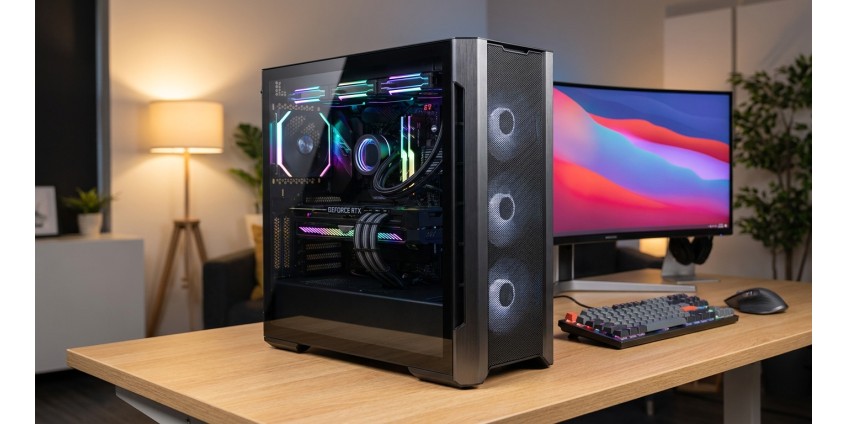
How to Choose a PC Case in 2026: Form Factors, Cooling, Cable Management, and Component Compatibility
Choosing a computer case is not just a matter of aesthetics. The right case ensures effective cooling, convenient system assembly and upgrades, and determines which components you can install. In 2026, the market offers a huge selection of solutions — from compact Slim cases to full-sized tower systems with advanced capabilities. Let's figure out what to look for when choosing a case for your PC.
Case Form Factors: Which One to Choose?
The first thing you need to decide on is the case form factor. It depends on the size of the motherboard you plan to use and your system expandability needs.
Micro-Tower and Slim Cases
Compact cases are ideal for office systems, multimedia centers, or PCs with limited space. They support Micro-ATX and Mini-ITX motherboard formats, taking up minimal space on or under your desk.
An example of such a solution is the Chieftec UNI BS-10B-300 mATX Case — a compact Micro-Tower with a Slim form factor. This case supports Micro-ATX and Mini-ITX motherboards, has a built-in 300W power supply, and modern front panel connectors, including USB Type-C and a card reader.

Such cases have their limitations: the maximum CPU cooler height for this model is 120 mm, and the graphics card length is limited to 240 mm. This is important to consider when choosing PC components.
Mid-Tower and Full-Tower
For powerful gaming systems and workstations, it's better to choose Mid-Tower or Full-Tower cases. They support ATX and E-ATX motherboards, offer more space for installing additional drives, powerful cooling systems, and long graphics cards.
Advantages of large cases:
- Space for installing multiple graphics cards
- Ability to mount liquid cooling systems
- Better airflow
- More drive bays
- More convenient cable management
Case Cooling: A Key Factor for Stability
An effective cooling system is the key to longevity and stable operation of components. Modern processors and graphics cards generate significant amounts of heat, so proper airflow organization is critically important.
Fans and Their Placement
When choosing a case, pay attention to the number of fan mounting locations. The optimal scheme is cold air intake from the front and bottom, and hot air exhaust from the rear and top. Most cases support 120 mm or 140 mm fans.
In compact cases, such as the aforementioned Chieftec UNI BS-10B-300, typically one 80 mm fan is installed. This is sufficient for office tasks, but for gaming systems, you should consider cases with support for multiple 120-140 mm fans.
Liquid Cooling Support
If you're planning to overclock your processor or use top-tier graphics cards, consider cases with liquid cooling system support (AIO coolers). Pay attention to the availability of mounting locations for 240 mm, 280 mm, or 360 mm radiators.
Cable Management: Order Inside the Case
Quality cable management is not just about aesthetics. Properly routed cables improve airflow, simplify system maintenance, and reduce the risk of accidental component damage.
What to Look For
- Presence of cable routing holes behind the motherboard
- Rubber grommets around holes to protect insulation
- Mounting points for cable ties
- Distance between the back panel and motherboard (optimally 20-25 mm)
- Power supply shroud for concealment
In compact cases, there's less space for cable management, so you should plan wire routing especially carefully. Modular power supplies significantly simplify this task, as they allow you to connect only the necessary cables.
Component Compatibility: Critical Parameters
Before purchasing a case, be sure to check its compatibility with all components you plan to install.
Motherboard
Make sure the case supports your motherboard's form factor. The most common options:
- Mini-ITX (170×170 mm) — the most compact
- Micro-ATX (244×244 mm) — optimal for budget and mid-range systems
- ATX (305×244 mm) — standard for most PCs
- E-ATX (305×330 mm) — for high-performance systems
Most cases support multiple form factors simultaneously. For example, an ATX case is usually compatible with both Micro-ATX and Mini-ITX boards.
Graphics Card
Maximum graphics card length is one of the most important parameters. Modern top-tier graphics cards can be 300-350 mm long, so compact cases won't work for them. In the Chieftec UNI BS-10B-300, for example, the maximum graphics card length is 240 mm, which limits the choice to compact or medium-sized models.
CPU Cooler
CPU cooler height is another critical parameter. Powerful tower coolers can be 150-170 mm tall, so they require appropriate cases. In compact models, the maximum height is limited to 120-130 mm, which is suitable for low-profile coolers or liquid cooling systems.
Power Supply
Modern cases typically place the power supply at the bottom, which improves weight distribution and cooling. Some compact cases, like the Chieftec UNI BS-10B-300, come with a pre-installed PSU, which simplifies system assembly but limits upgrade possibilities.
When choosing a case without a PSU, make sure it supports standard ATX power supplies or more compact SFX formats.
Storage Drives
Pay attention to the number of drive bays:
- 3.5" — for HDD hard drives
- 2.5" — for SSDs and laptop HDDs
- M.2 slots on the motherboard
The Chieftec UNI BS-10B-300 offers 1×3.5" bay, 2×2.5" bays, and 1 external 5.25" bay for an optical drive or card reader, which is quite sufficient for most home and office systems.
Front Panel: Connection Convenience
Modern cases are equipped with various front panel connectors for convenient peripheral connections.
Essential Connectors
- USB 3.0 / 3.1 / 3.2 — for fast data transfer
- USB Type-C — an increasingly popular standard
- Audio jacks (input and output) for headphones and microphone
- Power and reset buttons
The Chieftec UNI BS-10B-300 has a modern set of connectors: 2×USB 3.0, 2×USB 2.0, USB Type-C, and an SD card reader, making it convenient for working with various devices and media.
Materials and Build Quality
Cases are made of steel, aluminum, or their combination. Steel cases are stronger and cheaper but heavier. Aluminum cases are lighter and dissipate heat better but cost more.
Build quality affects:
- Noise level (panel fit tightness)
- Vibrations from fans and drives
- Ease of component installation
- Overall structural durability
Additional Features
Modern cases may have useful additional features:
- Removable dust filters for easy cleaning
- Tempered glass side panels to showcase components
- RGB lighting and controllers for it
- Built-in fan hubs
- Vertical graphics card mounting
Price Range and Recommendations
PC cases are available in a wide price range — from budget models at 1500-3000 UAH to premium solutions at 10000+ UAH. The Chieftec UNI BS-10B-300 at 7048 UAH offers an interesting price-to-features ratio: compact form factor, built-in PSU, modern connectors including USB Type-C and card reader.
For office systems and basic home PCs, such a case is quite sufficient. However, if you're building a powerful gaming system or workstation, you should consider larger cases with better cooling and support for full-sized graphics cards and ATX-format motherboards.
Practical Tips When Choosing
Before purchasing a case:
- Make a list of all components you plan to install
- Check their dimensions and compare with case specifications
- Consider the possibility of future upgrades
- Assess whether there are enough fan mounting locations
- Ensure the necessary connectors are present on the front panel
- Read reviews about the build quality of the specific model
- Consider the dimensions of the space where the PC will be placed
Conclusion
Choosing a PC case in 2026 is a balance between size, functionality, cooling, and budget. For compact office systems, Micro-Tower cases with built-in power supplies, like the Chieftec UNI BS-10B-300, are suitable. For gaming PCs and workstations, it's better to choose more spacious Mid-Tower or Full-Tower cases with good ventilation and support for large graphics cards.
The main thing is to carefully check the case's compatibility with all components before purchase, consider cooling needs, and anticipate the possibility of future upgrades. A properly chosen case will serve you for many years, outlasting several generations of internal components.
Products related to this post
₴69 грн. ₴109 грн.
Add to Cart

₴23,625 грн. ₴31,540 грн.
Add to Cart