



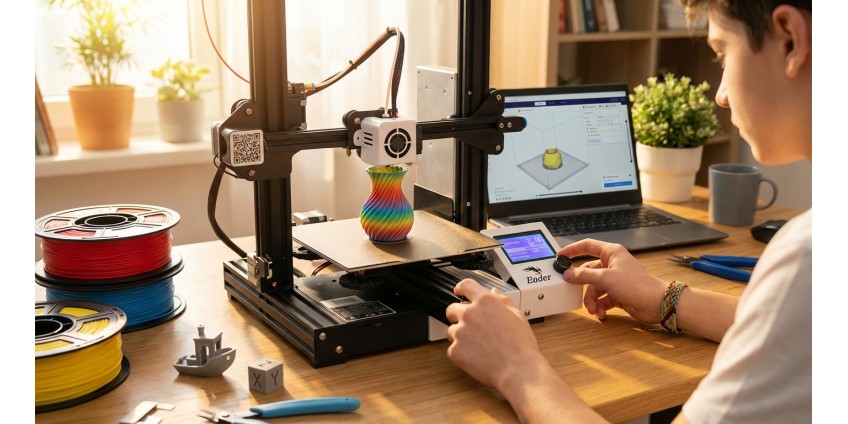
3D Printer for Beginners: How to Choose Your First Model, Set It Up, and Start Printing at Home
3D printing is no longer a technology of the future – today it's an accessible tool for creativity, learning, and solving everyday tasks. If you've long dreamed of trying your hand at three-dimensional modeling and creating physical objects but didn't know where to start, this article is for you. We'll explain how to choose your first 3D printer, what to look for when buying, how to properly set up the equipment, and start printing at home.
Why You Should Try 3D Printing
3D printers open up endless possibilities for bringing creative ideas to life. You can create unique home decor items, useful household gadgets, repair parts for appliances, toys for children, prototypes for business projects, or even costume elements for cosplay. The technology allows you to bring to life virtually any idea that can be modeled on a computer.
For beginners, 3D printing is also a great way to develop technical skills, learn more about materials science, mechanics, and design fundamentals. Many people start with simple models and later move on to complex engineering solutions. Our store has a special section 3D друк, where you'll find everything you need to get started.
Types of 3D Printers for Home Use
The market offers several main 3D printing technologies, but for beginners, FDM (Fused Deposition Modeling) printers are the most suitable. They work on the principle of layer-by-layer application of molten plastic, making them affordable and easy to maintain.
FDM printers can have different designs: with open or enclosed frames, with moving or stationary beds, with one or multiple extruders. For home use, the optimal choice would be a compact model with one extruder and a heated bed – such printers allow you to work with the most popular materials and don't take up much space.
What to Look for When Choosing Your First 3D Printer
Build Volume Size
For beginners, a printer with a build volume of 200×200×200 mm or slightly larger is optimal. These dimensions allow you to print most household items, decorative elements, and functional parts. A printer that's too large will take up a lot of space, while one that's too small will limit your possibilities.
Extruder Type and Heated Bed
A heated build plate is an important feature that prevents the model from warping during printing. This is especially critical when working with materials like ABS. If you plan to use mainly PLA plastic, heating is less critical but still desirable for better adhesion.
Ease of Calibration
Modern models are often equipped with automatic bed leveling systems, which greatly simplifies preparation for printing. For beginners, this is a very useful feature, as manual calibration can cause difficulties in the initial stages of learning the technology.
Support for Different Materials
Make sure the chosen printer supports working with different types of filament. PLA is the easiest material for beginners, but over time you may need to print with PETG, ABS, or TPU for different tasks.
What You Need to Get Started
Besides the printer itself, you'll need a few additional things. First, filament – the plastic thread from which the model is printed. For your first experiments, buy 1-2 spools of PLA in different colors. Second, software for preparing models for printing – a slicer that converts a 3D model into commands for the printer. Most slicers are free and intuitive.
It's also useful to have a basic set of tools: a spatula for removing models from the bed, side cutters for removing supports, sandpaper for finishing printed items. In the Аксесуари для 3D друку section, you'll find everything you need for comfortable work.
Initial 3D Printer Setup
After unpacking the printer, carefully read the manufacturer's instructions. Usually, the setup process includes several stages: assembling individual components (if the printer is not supplied fully assembled), installing the filament spool, calibrating the build plate, and loading the first model.
Bed Leveling
This is the most important preparation stage. The bed must be perfectly level relative to the extruder across the entire plane. In printers with manual calibration, this is done using adjustment screws at the corners of the bed. Use a sheet of paper as a feeler gauge – it should pass between the nozzle and bed with slight resistance at all points.
Loading Filament
Heat the extruder to the temperature recommended for your material (for PLA usually 200-220°C). Insert the end of the filament into the appropriate opening and gently push it through until plastic starts coming out of the nozzle. This means the material is loaded correctly.
First Print: Where to Start
Don't try to print complex models right away. Start with a test cube or cylinder, which usually come with the printer on a flash drive or SD card. These simple shapes will help you assess print quality and identify possible problems.
Once basic tests are successfully completed, you can move on to printing useful things. For example, you can make a ключницю-органайзер with your own design or other household items. The 3D друковані моделі category features finished products that can inspire your own projects.
Where to Get Models for Printing
There's a huge number of free online 3D model libraries. The most popular ones are Thingiverse, Printables, MyMiniFactory, and Cults3D. There you'll find millions of ready-made models for any taste: from practical organizers and mounts to decorative figurines and toys.
If you want to create your own unique models, you'll need to learn 3D modeling software. For beginners, Tinkercad (an online tool with a simple interface) or Fusion 360 (free for personal use) are suitable. Over time, you can move on to more professional solutions like Blender or SolidWorks.
Basics of Working with a Slicer
A slicer is a program that converts a 3D model into G-code – the command language for the printer. The most popular free slicers are Cura, PrusaSlicer, and Simplify3D (paid but with advanced features).
In the slicer, you configure key print parameters: layer height (0.1-0.3 mm for standard printing), print speed, extruder and bed temperature, model infill density, need for supports for overhanging elements. For beginners, it's recommended to use ready-made profiles for your printer model – they already contain optimal settings.
Common Problems and Their Solutions
Model Doesn't Stick to the Bed
Check bed leveling and cleanliness. Sometimes using special coatings helps: painter's tape, glue stick, or special adhesive sprays. Make sure the bed temperature matches the material.
Layer Separation or Delamination
This may be related to insufficient extruder temperature, too high print speed, or filament problems. Try increasing the temperature by 5-10 degrees and reducing print speed.
Stringing Between Parts of the Model
The problem is solved by adjusting retraction – pulling the filament back during non-printing movements. Increase the retraction distance and speed in the slicer settings.
3D Printer Maintenance
Regular maintenance extends the equipment's lifespan and improves print quality. After every 50-100 hours of operation, clean the nozzle of plastic residue, lubricate the guide rods with special grease, check belt tension and reliability of all connections.
Store filament in a dry place, preferably in sealed bags with silica gel. Moist plastic degrades print quality and can damage the extruder. Regularly clean the build plate of grease and dust – this improves adhesion.
Practical Tips for Beginners
Don't rush to buy the most expensive printer. Start with a budget model to understand if you're really interested in this technology. Many beginners overestimate their needs and buy equipment that's too complex, which then sits idle.
Join 3D printing communities on social networks and forums. There you'll find answers to most questions, support from experienced users, and inspiration for new projects. Don't be afraid to experiment with settings – it's the best way to learn.
Keep a print log where you record successful settings for different models and materials. This will save time in the future and help systematize your experience.
Conclusion
3D printing is a fascinating hobby and useful skill that opens up countless possibilities for creativity and practical application. Choosing your first printer may seem complicated, but by following basic recommendations regarding build volume size, presence of a heated bed, and ease of setup, you definitely won't go wrong.
Start with simple models, gradually increasing complexity. Master the basic principles of working with a slicer, learn to solve common problems, and don't forget about regular equipment maintenance. Use ready-made models from online libraries or create your own unique designs.
Remember that print quality depends not so much on the printer's price as on proper setup and understanding of the process. Experiment, learn from mistakes, and share your experience with other enthusiasts. The world of 3D printing is vast and constantly evolving – and now you're part of this technological revolution that makes manufacturing accessible to everyone right at home.
Products related to this post

₴78,120 грн. ₴116,999 грн.
Add to Cart
₴13,004 грн. ₴19,499 грн.
Add to Cart
₴16,799 грн. ₴24,086 грн.
Add to Cart
₴20,412 грн. ₴30,599 грн.
Add to Cart
₴23,184 грн. ₴31,499 грн.
Add to Cart