



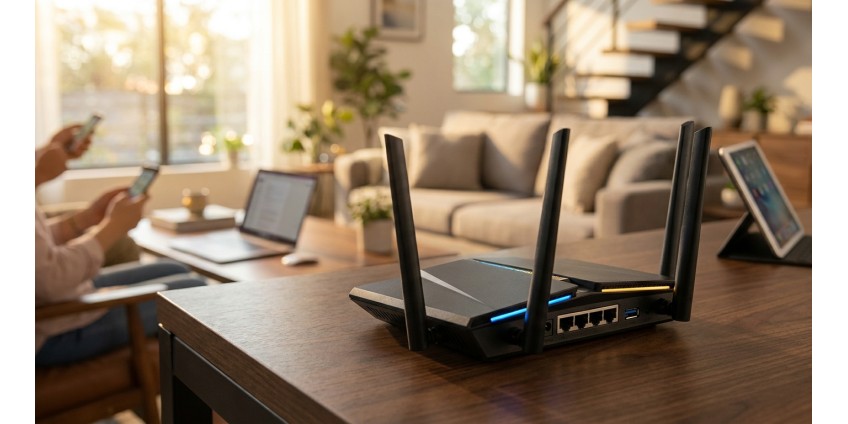
How to Choose a Router for an Apartment or Private House in 2026: Wi-Fi Standards, Coverage, Number of Devices, and Security Set
Choosing a router in 2026 is an important decision that affects the quality of your internet connection at home or in the office. Modern realities demand stable and high-speed connectivity for work, education, entertainment, and smart home devices. In this article, we'll take a detailed look at what to pay attention to when choosing a router to ensure comfortable operation of all your devices.
Modern Wi-Fi Standards: What You Need to Know in 2026
Wireless communication technologies are constantly evolving, and understanding current standards will help you make the right choice. In 2026, the market features several generations of Wi-Fi, each with its own characteristics.
Wi-Fi 5 (802.11ac) – A Time-Tested Standard
Wi-Fi 5 remains a popular choice for small apartments and moderate internet usage. This standard operates on two frequencies – 2.4 GHz and 5 GHz, providing speeds up to 867 Mbps on the 5 GHz frequency. For most household tasks, this is quite sufficient.
A good example of an affordable solution is the Cudy WR1200E Router, AC1200 Wi-Fi Router, which supports both frequencies and provides speeds up to 867 Mbps. This is an optimal option for apartments up to 80-100 sq.m, where 10-15 devices operate simultaneously.

Wi-Fi 6 (802.11ax) – The Standard of the Future
Wi-Fi 6 represents a new generation of wireless networks with support for OFDMA and MU-MIMO technologies, which allow for more efficient handling of a large number of devices simultaneously. This standard is especially useful in homes with many smart devices, surveillance cameras, and smart home gadgets.
Coverage Area: How to Determine the Required Power
One of the most important parameters when choosing a router is the signal coverage area. The wrong choice can lead to "dead zones" in your home.
Apartment: Selection Features
For a standard apartment of 50-100 sq.m, a router with two external antennas is sufficient. It's important to consider the wall material – concrete structures significantly weaken the signal, so for panel buildings it's better to choose devices with higher transmitter power.
The Cudy WR1200E is equipped with two external non-removable antennas, providing stable coverage for a typical apartment. Placing the router in the center of the premises will allow for even signal distribution throughout all rooms.
Private House: Network Scaling
For private houses over 150 sq.m, especially two-story ones, one router is often insufficient. In such cases, it's worth considering several options:
- Using a powerful router with four or more antennas
- Creating a mesh network with multiple devices
- Adding Wi-Fi repeaters to extend coverage
- Running network cables to remote points
Number of Connected Devices: Load Planning
A modern home network can include dozens of devices: smartphones, tablets, laptops, smart TVs, gaming consoles, surveillance cameras, smart speakers, and other gadgets.
Calculating Required Bandwidth
For a family of 3-4 people who actively use the internet, a router capable of stably serving 15-20 devices simultaneously is recommended. Wi-Fi 5 routers handle such loads if not all devices are actively using the internet at the same time.
If your household has:
- Multiple smart TVs for viewing 4K content
- Gamers playing online
- A surveillance system with 4+ cameras
- More than 25 connected devices
Then it's worth considering Wi-Fi 6 standard routers, which distribute channels between devices more efficiently.
Technical Specifications: What to Pay Attention To
Ports and Connections
A modern router should have a sufficient number of LAN ports for wired connection of important devices. The Cudy WR1200E has 3 LAN ports 10/100, which is enough to connect a computer, TV, or gaming console. A wired connection is always more stable than wireless, so critically important devices are better connected by cable.
The type of WAN port is also important for stable operation. A 10/100 port is suitable for plans up to 100 Mbps, which is the standard for most Ukrainian providers in 2026.
USB Port: Additional Capabilities
Some routers are equipped with a USB port, which allows you to connect an external drive to create a home file server or a printer for network printing. Although the Cudy WR1200E doesn't have a USB port, this isn't critical for basic use.
Home Network Security: Protection Against Threats
In 2026, the issue of home network security is particularly acute. The number of cyber threats is constantly growing, and proper router configuration is the first line of defense.
Basic Encryption Protocols
Be sure to use WPA3 encryption or at minimum WPA2. The old WEP and WPA protocols have long been cracked and don't provide adequate protection. When first setting up your router, change the default administrator password – this is critically important for security.
VPN Support
VPN support in a router is a useful feature for those who value privacy. The Cudy WR1200E supports VPN, which allows you to set up a secure connection for all devices on the network simultaneously. This is especially relevant for remote work and access to corporate resources.
Guest Network
Creating a separate guest network is a smart security practice. This allows you to provide internet access to visitors without opening access to your personal files and devices on the home network.
Additional Features and Operating Modes
Modern routers can operate in different modes, which expands their usage possibilities.
Repeater Mode
If you already have a main router but need to extend the coverage area, some models can be configured as a repeater. This is an economical solution for large premises.
Parental Control
For families with children, the parental control feature will be useful, allowing you to restrict access to certain sites and set internet usage schedules.
Practical Setup Tips
After purchasing a router, it's important to configure it correctly for optimal operation:
- Placement: install the router in the center of the premises at a height of 1-2 meters from the floor
- Firmware updates: regularly check for software updates
- Channel selection: use apps to analyze Wi-Fi networks to find the least congested channel
- Network name: change the default SSID to a unique one, but don't use personal information
- Strong password: create a secure password at least 12 characters long using letters, numbers, and special characters
Integration with Other Equipment
A quality router becomes the center of your home network, to which various devices connect. To ensure uninterrupted operation of the entire system, it's important to have reliable network equipment.
If you're planning to expand your home network, pay attention to quality network cables for wired connections – this will ensure maximum connection stability for stationary devices.
Conclusion: How to Make the Right Choice
Choosing a router in 2026 depends on several key factors. For a standard apartment up to 100 sq.m with moderate load (10-15 devices), a Wi-Fi 5 standard router with two antennas, such as the Cudy WR1200E, is quite sufficient. It provides stable speeds up to 867 Mbps, has the necessary ports for wired connections, and supports VPN for secure operation.
For private houses or apartments with a large number of devices, it's worth considering more powerful solutions with Wi-Fi 6 support, additional antennas, and advanced security features. Don't forget about proper router placement, regular firmware updates, and security settings – these are just as important as choosing the device itself.
Investment in a quality router will pay off with a stable internet connection, absence of connectivity problems, and comfortable operation of all your devices. Determine your needs, assess the coverage area and number of devices – and you'll be able to make the optimal choice for your home.
Products related to this post


![Collectible figure Labubu Toy [FDM printing]](https://gadgetguys.com.ua/image/cache/catalog/easyphoto/5906/grashka-ruhliva-red-panda-chervona-panda-fdm-druk-1-266x266.png "Collectible figure Labubu Toy [FDM printing]")
₴23,625 грн. ₴31,540 грн.
Add to Cart