



If Wi-Fi does reach the second floor but video stutters and calls drop, a repeater for 600-1000 UAH will mostly fix nothing: it halves your speed and adds latency. A mesh system works better, but only when the nodes are placed correctly. And in many houses the cheapest solution is something else entirely: one cable between floors. Below is a breakdown of where this comes from and how to choose for your own layout.
Why a repeater almost always gives you half the speed
A classic repeater with a single radio receives and transmits on the same band. While it is receiving a packet from the router, it cannot send to the client, so throughput is split in half. If the router delivers a real 200 Mbit/s to the repeater, your phone will get about 100 at best, and only if the signal between them is strong.
The second problem: a repeater amplifies what it hears. If it is placed where the signal from the router is already weak (say, -75 dBm), it will simply repeat a bad signal with a nice-looking indicator on the case. This is the most common story in our chat: "I bought a repeater, the bars are full, but there's no speed." The indicator shows the client's link to the repeater, not the quality of the channel to the router.
The third: separate SSIDs. A repeater usually creates its own network, and the phone stays attached to the distant router even when a stronger node is right next to it. You walk around the house on a call, and it "sticks" to a weak signal.
What mesh does differently
In a proper mesh system the nodes talk to each other using separate logic: they pick the best route, synchronize settings, and give clients a single network with wireless roaming. But the physics is the same. If a node sits where the signal from the main one is weak, the throughput between them is limited, and the speed on the second floor will be lower than over a cable.
The fundamental difference is a dedicated link between the nodes (backhaul). In more expensive systems this is a separate 5 GHz or 6 GHz radio; in the cheapest ones the nodes share the same airtime with clients, and we are back to losing half the speed. Before buying, ask exactly this: whether the system is "tri-band" or "dual-band" and whether there is a port for wired backhaul.
A comparison on the parameters that actually affect the result:
| Parameter | Repeater | Mesh (dual-band, wireless backhaul) | Mesh with a cable between nodes |
|---|---|---|---|
| Approximate price | 600-1500 UAH | 3500-8000 UAH per kit | the same, plus cable and installation |
| Speed loss on the second floor | up to 50% | 30-50% | minimal |
| Seamless roaming | usually no | yes, if it supports 802.11k/v/r | yes |
| Single configuration | no, separate interface | yes, through an app | yes |
| Installation difficulty | plug it into an outlet | place the nodes | run a cable |
The loss figures are approximate and depend on the floor material, the distance, and how crowded the 5 GHz band is with neighbors' networks. This is a general engineering estimate, not a measurement of a specific model.
When mesh is truly justified in a two-story house
Mesh makes sense in three situations. First: a reinforced concrete floor between levels and a long layout where a single router physically cannot cover the diagonal of the house. Second: you move around a lot with devices, calls, or video streaming and need proper roaming. Third: running cables is impossible (finished renovation, drywall without conduits) but you need a wireless solution.
Where to put the second node: roughly midway between the router and the "dead" zone, not in the dead zone itself. A guideline: at the node's location your phone should see a signal from the main unit no worse than -65 dBm. It is easy to check: use a free Wi-Fi analyzer on your smartphone, stand where the node will go, and look at the level. Weaker than -70 dBm means the node will sit "on the edge" and the speed between it and the main unit will be unstable.
In panel buildings and new builds with a reinforced concrete slab between floors, it is better to place the node so that the signal passes through the stairwell or an open gap rather than through the slab. One reinforced concrete ceiling with rebar eats far more of a 5 GHz signal than two brick partitions.
The most reliable solution people forget: a cable between floors
If there is any possibility of running a cable from the first floor to the second (through a service conduit, under the baseboard, along the staircase), it is usually the best option for the price and result. A second access point on a cable gives full speed without relay losses, and setting it up is simpler than setting up mesh.
Practical things buyers underestimate:
- Category 5e cable handles gigabit over 100 m, Cat6 is rarely needed; for a house 5e at 15-25 UAH/m is enough;
- a flat "carpet" patch cord can be run under a door or along the baseboard if you don't want to cut into walls;
- if a cable is not possible, look at Powerline equipment: the network runs over the electrical wiring. But with old wiring, different phases, or powerful appliances on the line the result is unpredictable, and the speed of identical kits can range from 20 to 300 Mbit/s on paper;
- for a wired extension of wireless coverage, look at Wi-Fi access points: they connect by cable and work as full-fledged nodes, and some models can be combined into one network.
What from our catalog works as a base
If the main router is old (Wi-Fi 4 or early Wi-Fi 5), sometimes replacing just that is enough, and the second-floor problem shrinks without any extra devices. For example: the TP-Link Archer AX53 costs roughly 3700-3800 UAH. According to the product card it is Wi-Fi 6 (AX3000, up to 2402 Mbit/s on the 5 GHz band), with 4 external antennas, 4 gigabit LAN ports and a gigabit WAN, and it supports MU-MIMO and OFDMA and carries the MESH mark.
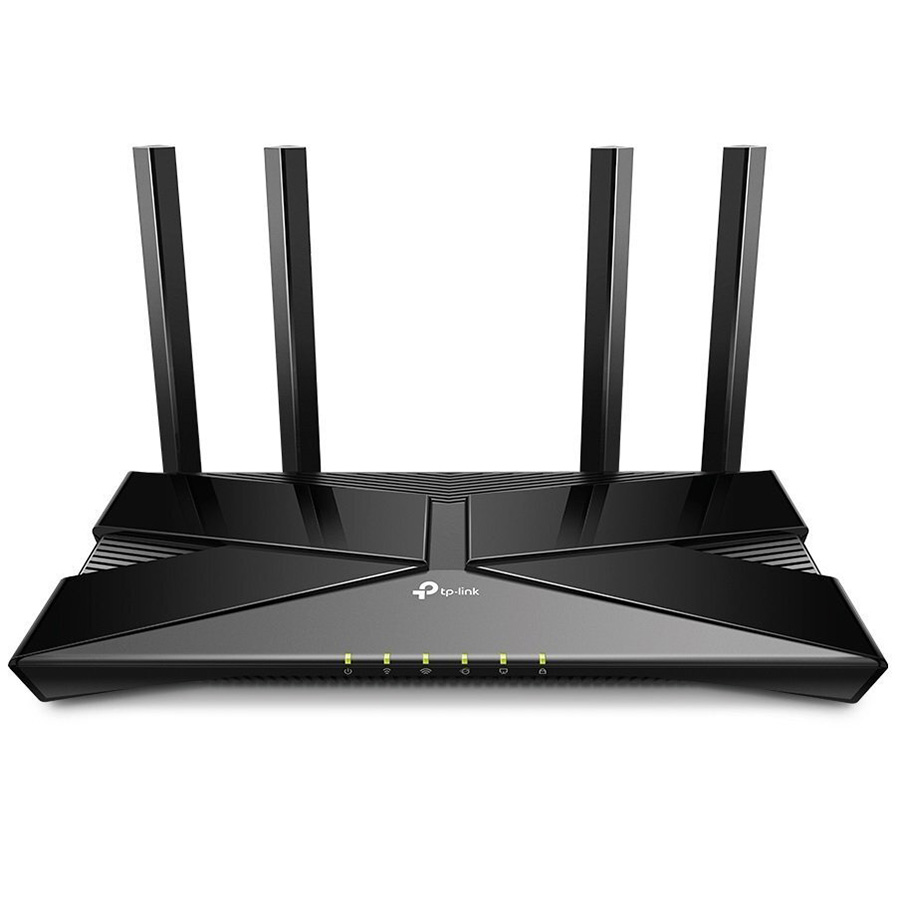
What this means in practice: with such a model you can start with one router and later extend the network with a compatible node from the same manufacturer if the floor turns out to be too heavy. Which version of the mesh standard is supported and with exactly which devices it is compatible is worth clarifying on the product page or with a consultant before paying: the card only gives the general MESH mark. Also, the specifications list no USB port, so this router will not work for a network drive or a USB printer.
For the cheapest experiment there are Wi-Fi repeaters, but place them only in a zone where the signal from the router is still solid (no worse than -65 dBm), and expect a speed roughly half of the main one.
How to check for yourself whether the step you took helped
- Stand in the "problem" room with a phone or laptop and run a speed test several times at different times of day. Write down the average, not the best result.
- Add latency (ping) to a website or DNS server to the test. For calls and games a stable latency under 30-40 ms matters more than a peak megabit.
- Walk between rooms with a video call open. If at the edge of the zones the picture freezes for a second or two, roaming is working badly: that is a matter of settings or of the system itself, not of speed.
- Check the channels. If in an apartment block or dense housing the 5 GHz band is clogged by neighbors, manually choosing a channel or a 40 MHz width instead of 80 MHz sometimes gives more than new equipment.
Typical mistakes that get equipment returned
- A repeater in the "dead zone." People put it where there is already no signal and wonder why it doesn't help. The unit has to be where the signal is still stable.
- Two routers with the same SSID on different channels without configuration. Devices drop the connection and reconnect chaotically.
- Expecting "up to 3000 Mbit/s" on a phone. The number on the box is the sum of the band speeds. Real speed is limited by the client's chip, the channel width, and the ceilings.
- Powering a node from an outlet with voltage swings. In private houses with unstable voltage, network equipment freezes or reboots more often. A separate surge protector or a small UPS for the router removes some of these problems. And during power outages, without a UPS the whole home network goes down along with the router.
When you shouldn't buy either mesh or a repeater
If the house is small (up to 100-120 m² of total area), the floor is wooden or light, and the router sits closer to the center rather than in a corner, proper placement and one modern router are often enough. Moving it from a bedside table in a corner to a shelf in the hallway on the first or second floor sometimes has a bigger effect than any new purchase.
Don't buy mesh if the problem is not coverage but the provider. Check the speed over a cable straight from the router to a laptop: if it is already below your plan, and on the second floor it is even worse, an expensive Wi-Fi system will change nothing. Sort out the line first.
Frequently asked questions
Can I combine a router from one brand with a repeater from another?
The repeater, yes: it works with any router over the standard protocol. But full mesh functionality (single management, fast roaming between nodes) is usually guaranteed only by compatible equipment from one manufacturer and one product line.
Does Wi-Fi 6 hurt older devices?
No. Older phones and laptops connect using their own standard, just without the benefits of the new one. Speed is limited by the capabilities of the device itself.
How many nodes do you need for two floors?
Usually two: one on the first floor, the second on the second floor. A third makes sense for an area over 200-250 m² or a very complicated layout. More nodes than needed just add interference for themselves.
Why is the internet "the same" after buying mesh?
Mesh improves coverage and stability, but it does not increase the speed your provider gives you. If your plan is 100 Mbit/s, you won't get more with any equipment.
If you are unsure, change the order of steps: first a speed test next to the router and on the second floor, then moving the router, then a cable between floors, and only after that mesh. In most houses the problem is solved at one of the first three steps, and an expensive system with wireless backhaul is worth buying when a cable truly cannot be run.


Comments