



How to Choose a 3D Printer for Home Use in 2026: FDM vs SLA Technologies, Materials, Software, and First Projects for Beginners
3D printing is no longer exotic—today it's an accessible technology for home use. If you're considering buying your first 3D printer, you'll face many questions: which technology to choose, what materials to use, where to start? In this article, we'll thoroughly examine all key aspects of choosing a 3D printer for home use in 2026.
Main 3D Printing Technologies: FDM and SLA
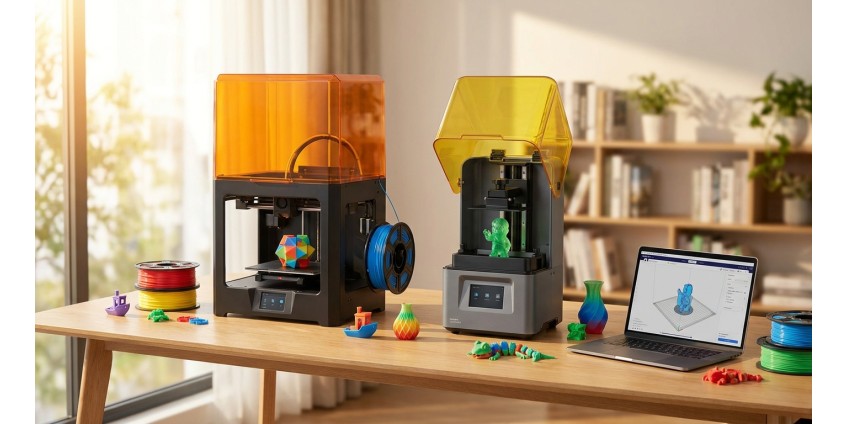
Two technologies dominate the home 3D printer market, each with its own advantages and usage features.
FDM (Fused Deposition Modeling) — Layer-by-Layer Deposition
FDM printers are the most popular choice for beginners. This technology works by melting plastic filament and applying it layer by layer. Main advantages of FDM:
- Affordable price for both printers and consumables
- Wide selection of printing materials
- Easy maintenance and operation
- Safe for home use
- Ability to print large objects
Disadvantages of FDM technology include visible layers on finished products and lower detail compared to SLA. To work with FDM printers, you'll need 3D printing plastic, which comes in various options.
SLA (Stereolithography) — Stereolithography
SLA printers use liquid photopolymer resin that hardens under ultraviolet light. Advantages of SLA technology:
- High detail and surface smoothness
- Ideal for small parts and jewelry
- Excellent printing accuracy
- Ability to create complex geometric shapes
However, SLA printers are more expensive to maintain, require additional post-processing of products, and resins have a specific odor and require careful handling.
What Materials to Use for 3D Printing
Material choice depends on the printer type and usage goals. For FDM printers, the most popular are:
PLA (Polylactic Acid)
The best choice for beginners. PLA is a biodegradable plastic based on corn starch or sugar cane. It prints easily, doesn't require bed heating, has virtually no odor, and comes in a wide color palette. PLA is ideal for decorative items, toys, prototypes, and educational projects.
PETG
A stronger and more flexible material compared to PLA. PETG is resistant to moisture and chemicals, withstands higher temperatures. Suitable for functional parts, containers, mechanical components.
ABS
A strong engineering plastic that withstands high temperatures. Requires a heated bed and well-ventilated room due to specific odor during printing. Used for products requiring high strength.
TPU (Thermoplastic Polyurethane)
Flexible material for printing elastic products—cases, gaskets, shock absorbers. Requires some experience in printer setup.
Software for 3D Printing
To work with a 3D printer, you need to master two types of programs: for creating 3D models and for preparing files for printing.
3D Modeling Programs
For beginners, we recommend starting with free solutions:
- Tinkercad — online editor with intuitive interface, ideal for first steps
- Fusion 360 — professional program with free license for personal use
- Blender — powerful tool for complex modeling
- FreeCAD — open-source solution for parametric modeling
Slicers — Programs for Print Preparation
A slicer converts a 3D model into G-code—commands for the printer. Popular slicers:
- Cura — free, user-friendly, with large user community
- PrusaSlicer — excellent default settings
- Simplify3D — paid, but with advanced features
First Projects for Beginners
It's better to start with simple but useful items that will help you master the technology and printer settings.
Space Organization
Start by printing organizers for small items, cable holders, phone or tablet stands. These are practical things that will immediately find use in everyday life. By the way, if you need ready-made solutions for cable organization, check out the cable organizers section.
Decorative Elements
Flower pots, candle holders, photo frames—a great way to personalize your interior. Such projects will help you master different print quality settings and work with colored filaments.
Functional Parts
Clothing hooks, jar lids, furniture handles, towel holders—all of this can be printed yourself. You'll be surprised how many small household items can be replaced or repaired with a 3D printer.
Toys and Gifts
A 3D printer opens wide possibilities for creating unique gifts. Personalized keychains, figurines of favorite characters, construction sets—all of this can be made at home. In our store, you'll find many ideas in the 3D printed models section.
What to Pay Attention to When Choosing a 3D Printer
Build Volume
For home use, a printer with a build volume of 200×200×200 mm is sufficient. If you plan to print large objects, consider models with a larger work area.
Print Speed
Standard speed of 40-60 mm/s is suitable for most tasks. Higher speed can negatively affect quality.
Accuracy and Resolution
Layer height of 0.1-0.3 mm provides good quality for home projects. Smaller height gives better detail but increases print time.
Extruder Type
Direct drive is better for flexible materials, Bowden is faster and lighter. For beginners, both options will work.
Heated Bed
Essential feature for printing most materials. Prevents model delamination from the bed during printing.
Auto-Leveling
Significantly simplifies printer setup, especially for beginners. Saves time and frustration.
Additional Accessories for 3D Printing
For comfortable work with a 3D printer, you'll need additional tools and materials. Check out the 3D printing accessories section, where you'll find everything necessary: spatulas for removing models, calibration tools, bed adhesive, knives and cutters.
Tips for a Successful Start
Don't try to print complex models right away. Start with calibration cubes and simple shapes to set up the printer. Study slicer settings—temperature, speed, infill. Each material requires its own parameters.
Join 3D printing communities on social media and forums. Experienced users are always ready to help with advice. Download ready-made models from free libraries such as Thingiverse, MyMiniFactory, Printables.
Keep a settings journal for different materials—this will help you quickly reproduce successful results. Don't be afraid to experiment with parameters, but change one at a time to understand the impact of each.
Safety When Working with a 3D Printer
Install the printer in a well-ventilated room. Some materials release harmful substances when heated. Don't leave the printer unattended during long prints—use surveillance cameras or regularly check the process.
Be careful with hot elements—the nozzle and bed heat up to high temperatures. Keep the printer away from flammable materials. Use quality power supplies and check electrical connections.
Conclusion
Choosing your first 3D printer is an exciting journey into the world of digital manufacturing. For home use in 2026, the optimal choice will be a mid-range FDM printer with heated bed and auto-leveling. Start printing with PLA plastic—it's the easiest to use and ideal for learning.
Master basic software, start with simple projects and gradually increase complexity. 3D printing is not just a hobby, but also a practical tool for solving household tasks, creating unique gifts, and realizing creative ideas. Visit the 3D printing section in our store to find everything you need to get started with this exciting technology.
Remember that success in 3D printing comes with experience. Every failed attempt is a valuable lesson that brings you closer to perfection. Be patient, experiment, and enjoy the process of creating your own unique products!
Products related to this post

₴549 грн. ₴699 грн.
Add to Cart

₴3,749 грн.
Add to Cart
₴76,230 грн. ₴101,768 грн.
Add to Cart